
 When it comes to staying on top of social media, one of the big challenges we have is to find the social media tools that will help us achieve a happy medium between curating, listening, engaging and producing content.
Frankly, I think that medium isn’t all that happy. It’s tough to find, and when we do find it, it stays with us for a while before it goes dancing off into the sunset, leaving us to figure it out all over again.
What to do? Such is life.
There are a ton of tools (and new ones coming out every day, it feels like) that purport to help us do this. I haven’t tested all of them – it would be impossible to do so! – but of those I have tested, here is what I currently think is the holy trinity of managing social media.
Bear in mind that my role has changed recently. I’m no longer a small business owner, but now work for a very large agency. In some respects, I think that makes me even more like many of the people I interact with, since I have to figure out how to CLEP (see sentence 1 above) for myself and my own content while fulfilling the responsibilities of my “day job.”
1. HootSuite
I’ve been a HootSuite fan for a long time. It’s a terrific way to post to a number of social networks, schedule posts and listen in on what’s going on, either by creating dedicated searches or creating streams of Twitter lists you’ve set up.
While I don’t necessarily use this to post to LinkedIn, etc., as much as I could, what I do find very useful, outside of the publisher, etc., is the ability to monitor and post to Facebook Groups directly from HootSuite:
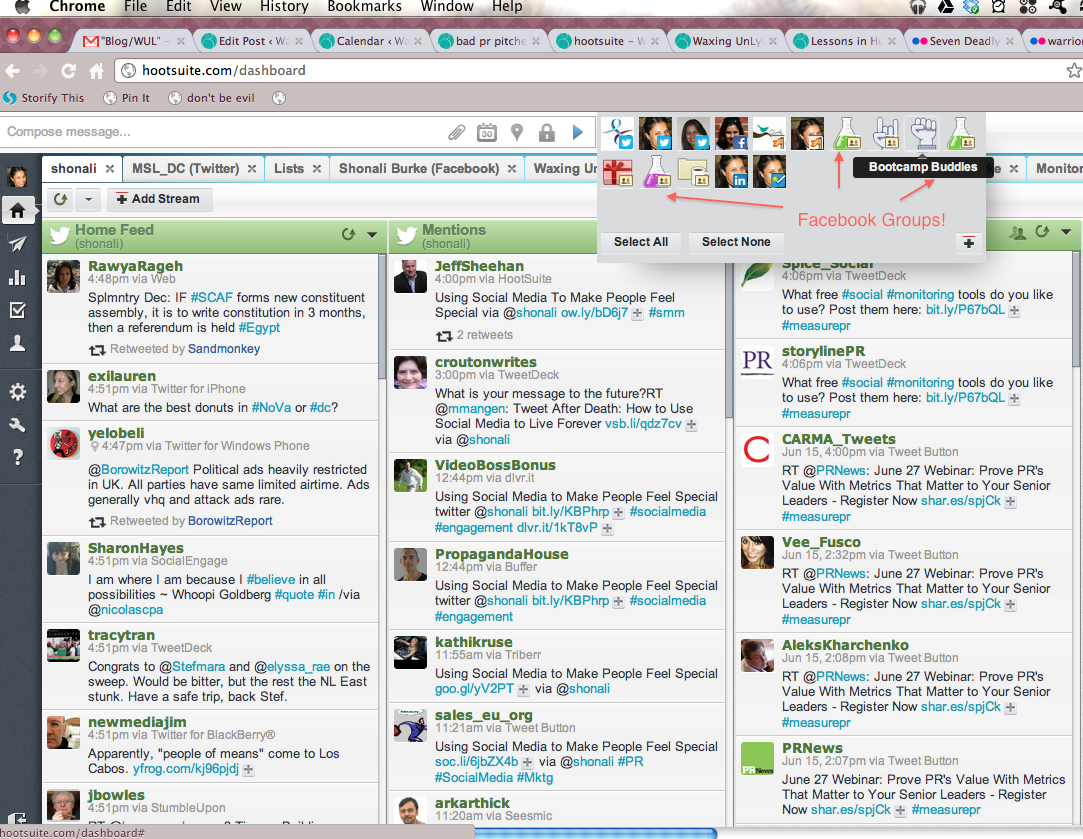
Now, typically I like to work Facebook “in” Facebook, as it were, but I know plenty of people who’d rather do all their Facebook management from a third-party app. And this fits the bill.
And just to go back to the scheduling feature, when people ask me to help them promote specific events, fundraisers, etc. I find the easiest way to do so is to schedule a ton of posts in HootSuite. (Assuming, that is, that those are things I want to help promote.)
I find this feature very useful; I can simply copy a post and bung it in at various points in the “publisher” view, making minor edits if I want.
So if you are really, really pressed for time, then I honestly don’t know of a better one-stop-management-shop for the primary social networks than HootSuite (and I’m more than happy to be educated, so if you do, please leave a comment below!).
2. Post Planner
I’ve also been a Post Planner fan for a long time. I find the team extremely responsive and the app just superb. Sure, you can post to Facebook from a number of different apps (including HootSuite), but PP rules, in my book, because:
a. There’s nothing like having your own branded footer, as I waxed lyrical about a while back.
b. Even though Facebook has recently introduced the ability to schedule posts, the feature is extremely clunky, IMHO, and Post Planner makes it a breeze.
c. Post Planner now lets you create lists of Pages and Groups to schedule posts to (though if you’re smart, you’ll still send them out at different times… but at least now you don’t have to schedule the same post over and over again).
d. It’s “status ideas” feature is just genius.
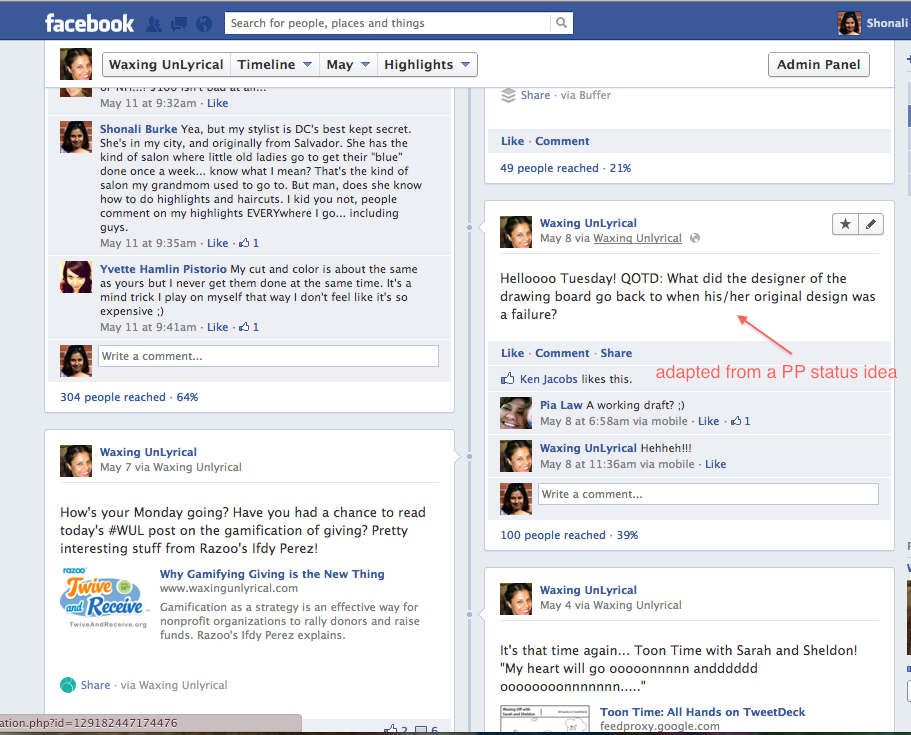
e. You can syndicate your blog posts to Facebook via your RSS feed.
f. If you don’t want your posts publishing automatically, you can still set up the RSS feature but set the publishing option to “suggest,” so that you can then send/not send out posts, or edit the accompanying status, as you wish.
g. You can give posting rights to a team for group posting, which is terrific! The app costs a little more if you add this feature, but I think it’s worth it.
h. Analytics, which can help you figure out not just which type of post performs the best, but when.
3. Buffer
I don’t think I’ve written about Buffer, which is somewhat surprising, because I love this app. Maybe it’s because after Jay Pinkert posted such a thorough write-up of it on Spin Sucks, there wasn’t really any need to… I just started using it immediately!
Buffer has made a lot of changes in recent months. It introduced an iPhone app not too long ago, and while that’s still a little clunky, overall it works pretty well.
But why would I need Buffer when I have HootSuite and Post Planner, you might want to ask me?
And, as a matter of fact, Krishna De asked me just that not so long ago:

Here is what makes Buffer critical for me: it integrates with Google Reader. And though most of the posts I share on a regular basis are through my participation in various Triberr groups or “tribes” (though I no long automate my Triberr posts), my Reader is a critical component of my reading and learning.
So I use Buffer to schedule posts when I:
a. See a really great post in my Reader and know that’s something I’ll want to share. This becomes particularly important if there are bloggers I read/learn from regularly with whom I’m not connected on Triberr.
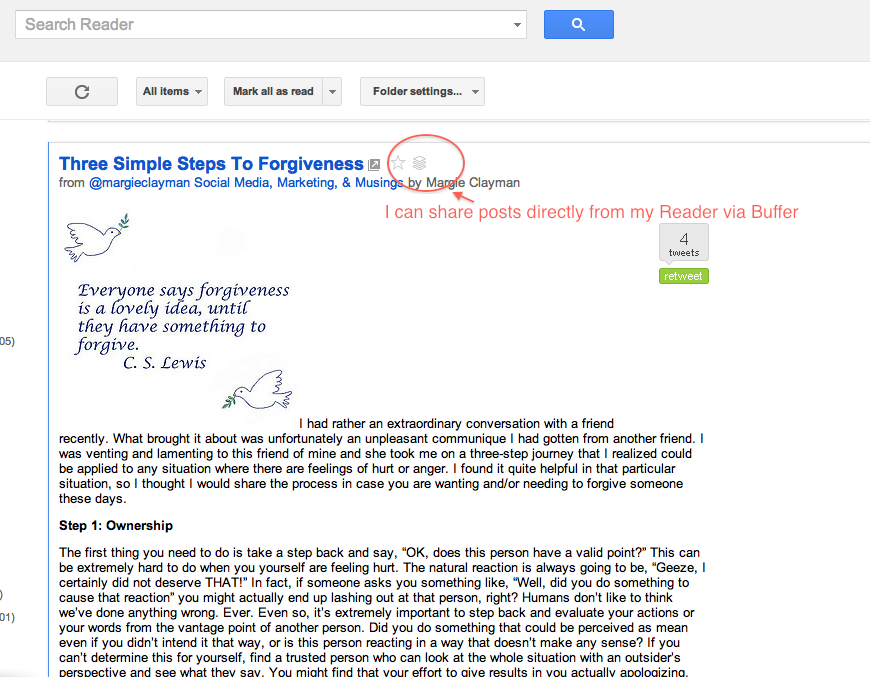
b. Want to share posts as a backup to Triberr (say I haven’t had time to get through my Triberr stream, if I Buffer a few posts, I know I’ll still be sharing some good stuff).
c. Am on the go and want to schedule posts from my iPhone or iPad; Buffer integrates with the RSS+ app (on my iPhone) and Mr. Reader (on my iPad). Note, I find it works better on the latter.
Though I have set up Buffer so that I could post to Facebook and LinkedIn from the platform, I usually don’t. This is for two reasons:
a. My primary platform for content curation is Twitter. So they typically contain the @ handle of the blogger publishing that post, etc. And I believe updates with a significant amount of “platform-ese” or terms specific to a certain platform are best reserved for use on that platform alone; and
b. I like Post Planner better for Facebook (or posting directly to Facebook), and I’m just not very active on LinkedIn at all.
I suppose that’s three reasons, but whatevs.
Recently, Buffer has also integrated with Twitter and Facebook, so you have another way to schedule posts to either platform (i.e. buffer them). That is very useful, but since I’m used to HootSuite and Post Planner, I haven’t really used that feature yet.
So, to summarize:
1. HootSuite rocks posting to multiple platforms, scheduling and “pay it forward” karma kind of tweets;
2. Post Planner rocks posting to Facebook probably better than Facebook will ever manage; and
3. Buffer rocks sharing posts from Google Reader, from your laptop as well as while on the go (and you can also use it as an alternative to scheduling via the two platforms above).
There you have it: my holy Trinity of managing social media. I hope this is helpful!
And please tell me: what are your favorite apps/platforms to manage your personal/company social media presence? Are there other platforms I should be looking at? Why? What has your experience of Post Planner, HootSuite and Buffer been? I’d love to know.
Top image: Andy Hares via Flickr, CC 2.0








I was billed $948 for a wrong plan and unwanted upgrade that they won’t cancel. And I had everything paid until July 2016. Buyers beware!!! #scam #fraud
Luigi, so sorry to hear – which tool are you talking about?
I’ve used them all and the only one I’d never touch again with a 10 foot pole is Post Planner. Not because of the software (though I prefer Hootsuite) but because of their policies. They bill you 2 months in advance of a renewal and there are NO pro-rated refunds at all. They are the stingiest SaaS company I’ve ever encountered.
I’m sorry to hear of your experience with Post Planner, Ben… that’s not been my experience at all. At one point (since I wrote this post) I did cancel my subscription, and it was really easy. Since then I’ve started using it again, and it’s made our lives much, MUCH easier. Full disclosure: I now have complimentary access to it, but even if I didn’t, I’d still use it.
Are there any other social media management tools you like and use?
[…] A little more insight what these applications are can be read over here on the Shonali Burke Consulting Inc website: Why Buffer, HootSuite and Post Planner are the Holy Tri… […]
[…] Why Buffer, HootSuite and Post Planner are the Holy Trinity of Managing Social Media […]
Please also consider including SocialMotus. We’re a new, free social management tool platform for businesses and individuals. We’re building some innovative and powerful conversion tracking and social management features including priority messages inbox, targeted Twitter followers discovery, sales conversions by posts and much more. You can review it by signing up for free here http://www.socialmotus.com or emailing me for more information.
One of the cool features of Buffer (which I love) is it’s integration to bit.ly which in turns allow you to use custom URL shorteners – which enhances your brand. I just post the URL to Buffer and it automatically shortens it to my custom URL shortener which is sza.bo (how cool is that)!
@MarketingChef That is a great tip and very true. I need to set up my custom URL shortener in bit.ly… I still haven’t done that – ack!
Zoniz is a automated system that helps you get more exposure on social networks, turning the people that visit your website or store into your fans and followers.
With the help of Zoniz, you will increase your fan base, open a dialog with your customers, get feedback and promote your product or services directly to your fans and their friends.
http://zoniz.com
[…] in general I believe planning (such as, on the work front, planning your social media management) to be a good thing, since how do you get somewhere if you don’t have a plan for […]
Found that on http://Bananajoke.com
@amyvernon How nice of you, and to share too – thank you!
[…] Why Buffer, HootSuite and Post Planner are the Holy Trinity of Managing Social Media […]
@nieuwemediagids Thanks so much for sharing!
I have been using bufferapp for 2weeks and just love it. So simple to use no matter what web content I’m trying to share. Just one click on my browser tool bar and I’m ready to go.This automatically times the tweets.
@Chineseastrology It makes life SO easy!
@nusparkmktg Thanks so much for sharing!
@MariSmith @shonali Great tips. I have always wondered why you would need other tools when Hootsuite does most of it. Thank!
@icanlearnitnow Thanks so much! @marismith
@shonali @marismith Great to help people gain understanding in this broad, fast paced new digital world isn’t it? Thanks for the mention!
@icanlearnitnow Thank YOU! @MariSmith
@Icanlearnitnow Very true!! :) cc @shonali
@MariSmith nice to see you use #hootsuite Owloha from Maui!
@lifeinparadise Aloha back!! xx
@marismith Thank you so much, Mari, I really appreciate the share!
@sowebinc @kaleidico @karenfour @smintrovert @pieheads Thanks so much for sharing!
@Carloslaspalmas http://t.co/6iQwjffZ
@kepeena @jgarant Thanks much for sharing!
@kepeena gebruik jy/jul Post Planner?
@kulkunstenaar Nope, gebruik wel Hootsuite. Probeer mense oortuig om te switch van Cotweet af – gathering ammunisie.
@kepeena o I see. Ek soek na ‘n oordentlike system..
@kepeena ek haat net hoe Hootsuite nie links expand in Facebook nie. (maar dis seker meer Facebook as Hootsuite though)
@kulkunstenaar Gebruik Hootsuite net vir Twitter. Onnodig om dit te gebruik vir FB.
@mrdancohen Thanks, Dan!
@martinwaxman @shonali We love those tools. Have you heard of Newsle? We think you’ll love it too: http://t.co/oEV42fpu
@martinwaxman Thank you, my friend!
@shonali Really enjoyed the post! Hope you had a great week.
@martinwaxman I did, thank you! What about you?
@shonali Doing really well! A few busy weeks on new biz proposals – which is hectic and fun… not as much time on my blog though…
@martinwaxman Oh, don’t even get me started on that one…
Great post @Shonali I use Hootsuite but want a better analytics. Really wish I could get number of mentions and retweets etc Do I need the Pro Package for that? Or can i get that now with @DannyBrown ‘s Jugnoo?
I was going to try post planner. But since it was for a client who doesn’t pay me enough anyway I never signed up. Plus I try not to use any facebook apps because they demand access to all our data and network even people like myself who have 100% private pages etc. But now I use the Facebook scheduler which is so 1999. I mean serious why does the drop down allow back in time vs forward in time? Hootsuites is great!
Haven’t tried buffer will have to check it out. Just way too many networks now days no wonder people use Facebook less than they used too. It isn’t because one network has siphoned time it is the number of them. Pinterest, Twitter. G+. Path, Tumbler. Blogs. Now the new Spring Pad is going to start sucking me in.
As satisfeye would say Halp!
http://icanhascheezburger.com/2010/12/23/funny-pictures-i-been-steamrolled/
@HowieSPM @Shonali satisfeye Hey there Howie,
Check out our release next month – major update and will have the info you need, as well as much more. Happy to jump on Skype screenshare and go over the release with you. :)
@DannyBrown @Shonali i have a meeting next week with Hayden. Who btw says he doesn’t know you or belllindsay 8)
@HowieSPM @DannyBrown @Shonali @belllindsay
Who’s Hayden…? ;)
@belllindsay You beat me to that! I was going to ask that exact same question! @HowieSPM
@shonali I love any tweet & post that includes the phrase ‘holy trinity’ Going to kick the tires now on Buffer!
@jessflynn Hahah! I loved that I had a chance to USE that phrase, LOL. Let me know what you think of @bufferapp :)
@shonali we like puppy love too! Thanks for spreading the word.
@ifttt My pleasure – I’m going to dig in some more this weekend, looks like the possibilities are endless!
@IFTTT http://t.co/zj5eGnk0
@thisisjeffrey @brasonja Thanks so much!
@shonali #YouAreWelcome
@shonali You’re welcome :)
I prefer hootsuite over tweetdeck for sure and I’m trying to get into the habit of using @buffer more. I downloaded the RSS+ app that you recommended for the iPhone but I can’t find the buffer integration anywhere. The iTunes store write up didn’t mention anything about buffer either. I heard Reeder is a slow alternative so I could use some suggestions. Post planner looks like a great tool also, I’m just not very active on Facebook. Great post on social tools!
@Matt Vazquez So… you have to go to the bufferapp blog and get the instructions on setting up Buffer for iPhone. Once you do that (and it’s pretty straightforward), then the option will show up in RSS+ etc. Right joelgascoigne ?
I’m not sure if “Reeder” is the same iPad app as “Mr. Reader” (the one I mentioned above)… is it? Because the one I use is terrific.
@brasonja good night Boris
@thisisjeffrey Good morning Jeff, have a great day and enjoy the coffee :)
@brasonja yes, I just have my coffee and am really to go. Have a great night.
I’ve been using @bufferapp for a week now and love it. So simple to use no matter what web content I’m trying to share. One click on my browser tool bar and I’m ready to go. Buffer automatically times the tweets for my audience. Also a longtime user of @HootSuite Now I’ve got to take a look at Post Planner. Thanks!
@HiveDan You’re welcome! Did you see the @PostPlanner special offer? Valid only tonight!
@BeckyGaylord Thank you so much! Did you see the special @PostPlanner offer for #WUL readers only?
No, and that was the only one of those three I don’t already use! Will check it out, for sure. Thx @shonali @postplanner
@BeckyGaylord You’re so welcome! Check it out soon, it’s only valid tonight! @postplanner
I started using buffer a couple months ago, and I’m still not completely convinced. I understand the business use for it, but I don’t like it when I see too many people using it from their personal accounts. I feel like all of these tools that schedule posts just turn individuals into news tickers, which really clogs up my feed.
@AdamBritten That’s the beauty of social media – there’s no right or wrong way to use it, just the right way for you.
@DannyBrown Amen.
@AdamBritten Like Danny said, it’s about what works for you. I shared what works for me… and since that often helps/answers the “FAQs” people have, I shared it on my blog. But it’s possible that something completely different is what will work for you.
I believe something like Buffer is very valuable, IMHO. It doesn’t overdo the number of times you can post, so it helps people space out their micro-blog publishing schedule. That is not something you could have said 4 or 5 years ago… so simply in terms of the time savings (which is a primary angle of this post) that’s huge.
@NancyCawleyJean Terrific! Did you see the special offer @PostPlanner came put with for #WUL readers?
@shonali I didn’t but will be sure to check it out. THANK YOU!
@nancycawleyjean You’re so welcome!
Awesome post, Shonali. This is the third time I’ve heard great things about Buffer in the past few days! Guess that means I should check it out, huh? :)
@annedreshfield Yea… like… NOW! ;)
I’m primarily using Hootsuite and Buffer, but really need to take the time to lean Jugnoome; I haven’t spent the time I need to in it, but what I’ve done seems very user friendly.
Sometimes it is like herding cats in social, so some of these tools are a real help.
@bdorman264 Give me a holler anytime, mate, would love to get you up and running. :)
@bdorman264 You heard @DannyBrown , HOLLER!!!!!
Hi Shonali,
Great overview (as usual) and I’m a huge fan if Buffer.
It’d be lax of me to not mention jugnoome , especially with @KenMueller ‘s bang on review of its strengths:
http://inklingmedia.net/2012/06/19/the-small-business-social-media-swiss-army-knife/
And this is just the beginning – you should see what we have planned for the next 2 updates… ;-)
Cheers!
@DannyBrown It sounds like jugnoome is pretty exciting, for sure… and I’m so looking forward to showcasing them – the issue I had was that I felt as if I was in a bit of a quandary… now that I’m no longer technically a “small business,” there wasn’t a way for me to continue to test the platform (which I was really excited about). I don’t know if that’s still possible, but if it is, I would love to be able to do so. Regardless, though, from all I’ve seen & head of JM, it is indeed very exciting! @KenMueller
@Shonali jugnoome @KenMueller Oh, for sure, miss – we’re built to help any level: SME, SOHO, mid-market, etc. We’ve changed a lot since the version you tested out, would love to jump on a call and go through with you.
We just released a patch update today – Facebook Profiles and Pages are now included, and more to come. :)
@DannyBrown jugnoome That would be terrific! I probably can’t talk until early/mid-July… would that still work?
@greenbuzzagency Thank you! And @jocmbarnett @livejulie too!
Shonali thanks for sharing your insights into your three favourite tools.
They are all great tools for small businesses and those on a limited budget.I could not manage my own Twitter account without the use of hootsuite and highly recommend it.I really like Post Planner is you want to post scheduled content – and that is a great offer from @JoshuaParkinson who is great in terms of customer support – I am looking forward to hearing how they further develop the app.I know many people love Buffer so it is great to get your insights on how you use it. I have tested it but just had not seen the benefit to date – I know the team work hard on new developments too.
krishnade You’re so welcome – actually, I have to thank you for making me write this post, because until that time, it was just a sparkle in my eye! ;)
Let me know what you think of PP… I truly think it’s awesome!
@Shonali You are welcome. I am already using the pro version of Post Planner hence the comment re @JoshuaParkinson and his customer service :)
@krishnade I completely agree, @JoshuaParkinson rocks!
Thanks @Shonali @krishnade !… we do what we can. :)
I’ve tried all of these, but haven’t stuck with any of them. Never really liked Hootsuite and they kinda ticked me off the other day when they started hijacking my tweets and blog posts (particularly my review about another platform – Jugnoome) to try to sell their product to people on Twitter, and in the comments on Social Media Today.
With PostPlanner, there wasn’t enough there to make it worth paying for for my particular uses. And Buffer, perhaps I didn’t give it enough of a chance.
I do very little scheduling any way, but in testing the scheduled posts on Facebook vs. similar ones scheduled from other apps with clients, we’ve noticed greater exposure from those done directly within Facebook. But need to test that some more.
@KenMueller We got your back, Ken. Seems your tweets aren’t the only “hijacking” they’re doing. ;-)
http://blog.jugnoo.com/jugnoo-thanks-hootsuite/
@KenMueller Well, obviously I haven’t had the HootSuite experience you have…. so I’ll just stop there as far as that part of your comment goes!
In terms of scheduling – there was a time when I didn’t schedule anything. Then there was a time when I scheduled a little. Then there was a time when I scheduled more than a little. I think you can tell that even when I schedule now… as in, currently… I’ve actually “manually” scheduled those posts, via my editorializing, etc. – but the point of introducing scheduling in is that I know I am curating some good content (according to me) without having to be on the platform 24/7. If for a moment I thought I was losing my “voice” because of it, I’d stop (part of why I switched back from automatic to manual on triberr … and that has actually made my use of that platform even better.
@shakirahdawud Thanks, Shakirah!
@lisagerber Thank you for sharing, and from @bufferapp to boot!
@meshugavi Thanks so much for sharing!
I like Buffer a lot; it’s one of the few I’d consider paying for.. if ever I’d consider it. (Small business consultant, I’m very picky about what services I buy.) HootSuite I’m just now trying since TweetDeck will apparently never schedule a post again. I like it, though I haven’t tapped into the full power like posting to LI Groups. PP looks interesting – except I’m not running that many FB pages that I need that much power, flexibility.
Think there’s a balance w/ these, all tools – you want them to do the work for you, or at least make it easier; not make you have to work for them. It’s why I still can’t figure out any IFTTT – I don’t automate much of anything, not even pimping my own posts, so not much to ‘set and forget’ beyond some self-scheduling. Now when there’s an app that can do the actual reading-commenting-custom tweeting/posting for me – you bet I’ll sign up. :-) FWIW.
@3HatsComm I know what you mean about being really picky about what you pay for (even though I’m not on my own now, I’m still picky… or is “cheap” a better word, hahaha!).
I do think, though, that some of these tools are worth their weight in gold. And for me, if I”m paying $10 per month (e.g. Buffer), I know I spend more on that on, say, a manicure. So even if I equate the once-a-month cost of each, I’d happily forego (if I had to) a manicure in favor of something that made my business life easier. The whole opportunity cost principle at play, is what I mean.
You know, I was very skeptical about IFTTT … until I tried it. I’m kinda in love with it for the moment… now, I have to test it some more, and see whether it’s puppy love or the real thing, LOL! And for all I know, you’ll be able to set up a recipe that does all the above for you!
SO good to see you here, Davina. Thank you for stopping by!
Thanks Shonali, this is what we love about you – you deliver tremendous value
@prosperitygal How kind of you – thank you!
Is it just me or are you posts getting even better. I had no idea Post Planner was such a great tool. Definitely checking it out.
@Tinu I’m trying. ;) But seriously, I thought I told you about PP ages ago…! It’s brilliant. Seriously. I love it to death.
@shonali Thanks 4the sweet unlyrical waxation! let ur peeps know about 30dayFREE trial of BrandedApp w/coupon “WAXING1” http://t.co/jJwmeqhU
@postplanner You’re welcome!
Great post, Shonali! We (Post Planner) are honored to be in such esteemed company. :)
To show our gratitude, I’d like to offer your tribe of tribes a 30-day FREE trial of our Branded App. If your peeps are interested, they can head here and use coupon code “WAXING1”:
http://www.postplanner.com/schedule-facebook-posts-branded-app/
Offer expires tonight. Thanks, Shonali!
@JoshuaParkinson Wow, that’s terrific – thank you! I will share at once! Hey, mattlacasse shakirahdawud lisabyrne lisagerber Tinu Abayomi-Paul Michele Price Joel Libava for starters… if you haven’t yet tested PP/its branded app, check this out!
@Shonali @JoshuaParkinson shakirahdawud lisabyrne lisagerber Tinu Abayomi-Paul Michele Price Joel Libava Awesome. I’ll definitely check it out!
@Shonali Wow, thanks for the offer, @JoshuaParkinson and the invite, Shonali! It’s the only one of the three I’m not using, so I’ll be happy to give it a try.
@ShakirahDawud @Shonali @JoshuaParkinson I LOVE BUFFER! OK, interestingly, I use Hootsuite, Buffer but not PP either. So… it gives ideas for engaging with the audience? I might really need this for a client if that’s the case!
@Lisa Gerber @ShakirahDawud @Shonali no prob @ShakirahDawud …. yes, @Lisa Gerber , we have a database of over 5000 status ideas proven to work on fan pages. Give it a shot!
@Lisa Gerber @ShakirahDawud @Shonali @JoshuaParkinson You use Hootsuite? *cough* ;-)
@DannyBrown @Lisa Gerber @ShakirahDawud @Shonali @JoshuaParkinson Um yes. on my phone!
@DannyBrown @ShakirahDawud @Shonali @JoshuaParkinson Can’t wait for jugnoo to go mobile. :)
@Shonali Thanks. I’ll try to scope it out :) JL
@FranchiseKing Did you try it yet?
@eberm Thank you! And I haven’t forgotten about getting back to you on the other thing. Hopefully tomorrow!